
Server solutions
Design, procurement and setup of Windows servers – domain controllers, file, database and application servers. Sized for your actual workload, not for catalogue recommendations.
Servers, network & cloud
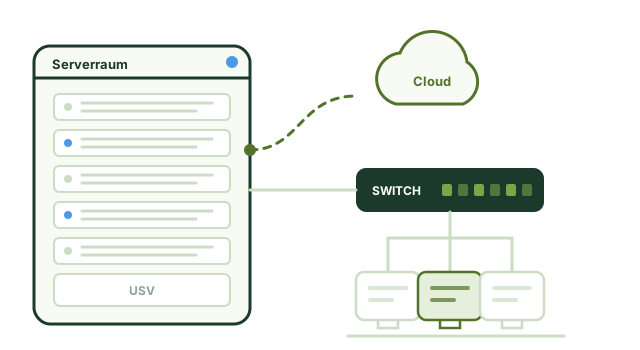
Servers, network, storage and cloud need to be thought through together. We plan and run infrastructures that suit the way you work – in your own server room, in the cloud or a combination of both. We plan and run infrastructure for small and medium-sized businesses in Cologne and the Rhineland – from a single server to networking several sites. As a rule, we can be on site within an hour.
The starting point
A server from 2018, because the old one failed at the time. A NAS someone bought for the design data. A cloud storage service the accounts department uses. A switch nobody can account for any more. Over the years, this creates a landscape that works, but that nobody fully understands any longer – and that becomes more expensive with every step of growth.
We bring structure to it. First with a complete inventory of what is there. Then with a target architecture that will carry you through the next three to five years. And finally with a step-by-step migration that does not interrupt your business.
For us, the cloud is not an end in itself. For some applications Microsoft 365 is clearly the better choice; for others – such as CAD data, large databases or applications with strict latency requirements – an on-site server remains the more economical solution. Usually the answer is hybrid.
Services in detail
From replacing a single server to a complete overhaul of your IT landscape – we plan, procure, migrate and operate.
Design, procurement and setup of Windows servers – domain controllers, file, database and application servers. Sized for your actual workload, not for catalogue recommendations.
Consolidating several physical servers onto Hyper-V or VMware. Less hardware, lower power consumption and much faster recovery after an outage.
Structured cabling, switching, Wi-Fi coverage planning, VLAN segmentation and VPN connections for branch sites and home-office workstations.
Central storage with Synology or a classic SAN/NAS, including a snapshot concept, replication to a second site and a well-thought-out permissions structure.
Moves to new Windows Server versions, from Exchange to Microsoft 365, from physical to virtual or from one data centre to another – planned, tested and with a fallback option.
Uninterruptible power supply, rack installation, cooling and access control. So that a power cut does not corrupt a database.
Cloud
For businesses with fewer than fifty workstations, the sensible route almost always has three stages – in this order, because that way the benefits come early and the risk stays small.
The entry point with the best ratio of benefit to effort. No more in-house mail server, work from anywhere, meetings without extra software. As a rule via Microsoft 365.
Shared folders move to the cloud. This step pays off as soon as several sites or home workstations are involved. What matters is a structure that takes permissions into account from the start.
The tricky step. Many line-of-business applications depend on low latency, and not every vendor supports running them in the cloud. Here we check carefully beforehand rather than just moving things.
How we work
Major overhauls rarely fail because of the technology. They fail because of a lack of planning and dependencies nobody had on their radar.
We record the existing landscape in full: systems, versions, licences, interfaces, data volumes, dependencies and maintenance contracts.
You receive a target architecture with the reasoning behind it, a cost framework and a timeline. Including an honest statement of what you can keep.
New systems are built and tested in parallel before live data is moved. That way the fallback option remains available until the very end.
Migration in an agreed maintenance window, follow-up support during the critical first days, complete documentation and training.
Why INFONET
There is no one-size-fits-all answer to this question. It depends on your applications, data volumes, connectivity and legal requirements.
Is your server still running Windows Server 2016 or older?
Then a change is coming in the foreseeable future. The earlier it is planned, the cheaper and smoother the migration. We will give you an assessment with a time frame and cost framework.
Frequently asked questions
Not necessarily. For email, collaboration and Office, Microsoft 365 is the better solution in most cases. Applications with large data volumes, strict latency requirements or special data protection requirements, on the other hand, often continue to run more economically on an on-site server. We calculate both options over five years before you decide.
The preparation – assessment, planning, building and testing the new environment – takes two to six weeks, depending on scope. We schedule the actual switchover for a maintenance window in the evening or at the weekend, and it typically takes four to twelve hours. Ideally, all your staff notice on Monday is that everything runs faster.
With virtualisation, several logical servers run on one physical machine. This reduces hardware, power consumption and space requirements. The bigger advantage, however, lies in operation: a virtual machine can be backed up, copied, moved to other hardware and restored after an outage within minutes. We work with Hyper-V and VMware.
Often yes – at least in part. Desktop computers, switches and storage systems can often continue to be used or be repurposed for non-critical tasks. During the assessment we tell you clearly what makes sense to keep and what should be replaced for security or maintenance reasons.
Yes. We procure servers, network equipment, desktop computers and peripherals through our distribution partners and take care of warranty extensions and maintenance contracts. If you prefer, also as a leasing or rental model, should you want to spread the investment over the term.
Yes, via VPN, Remote Desktop Services or Microsoft 365 access – depending on which applications your staff need from outside the office. What matters is security: multi-factor authentication, encrypted connections and a permissions concept that also applies when working from home.
The purchase price of the hardware is the smaller part. On top of that come the operating system and virtualisation, client access licences per user or device, an uninterruptible power supply, setup and data transfer, and the vendor maintenance contract – without which there is no next-business-day replacement part if something breaks.
Over the usual service life of five years, these additional items often add up to more than the device itself. If you only compare the purchase price, you are comparing the wrong thing.
Our Guides section has a detailed comparison with a calculator into which you can enter your own figures.
For businesses with fewer than fifty workstations, the sensible route almost always has three stages, in this order: first email and collaboration, then file storage, and last – if at all – the line-of-business application.
The first two stages bring the greatest benefit at the lowest risk: working from anywhere, no more in-house mail server, automatic updates. The third stage is the tricky one, because line-of-business applications are often tied to low latency and their vendors do not always support running them in the cloud.
What is not on the provider's invoice but is part of the picture: your own backup, sufficient bandwidth and a second internet line as a fallback.
There is no general answer, because items are regularly missing on both sides. With your own server, the running costs are underestimated; with the cloud, the one-off migration and everything that comes on top of the provider's invoice.
As a rule of thumb from practice: with large data volumes and old line-of-business applications, your own server usually wins; with distributed sites and a lot of mobile working, the cloud does. Very often, however, the right answer is a mixed solution – and that is not a compromise born of indecision, but often the cheapest and most robust option.
Whoever built the infrastructure should also run it – with monitoring and fixed response times.
Learn moreSegmentation, backup and an emergency plan – built into the architecture from the start.
Learn moreVoIP runs over the same network. Planning both together avoids call-quality problems.
Learn moreMailboxes, Teams and file storage – set up, supported and backed up in addition.
Learn moreClients
Whether a targeted one-off assignment or a long-standing partnership: when precision and reliability matter in IT, well-known names from retail, aviation, industry, medical technology, logistics and the events business rely on our expertise. An extract from our list of references:

REWE

Lufthansa Systems

RTL

Circus Roncalli

Fluke

Tektronix

Ewals Cargo Care

emeis Fachklinik Bensberg

pfm medical

Guett-Dern

Hans Jungblut

Intercom

Von Borries & Partner

TUNA FOOD

Morawitzky
Further reading
Detailed answers and real projects from our work – free of charge and without registration.
Service
Server replacements, Exchange and moves to the cloud – more than 1,200 migrations.
ReadGuide
The calculation over five years, with a calculator for your own figures.
ReadCase study
How a server failure no longer brings the business to a halt.
ReadCase study
Connecting sites with shared file storage and telephony.
ReadGuide
Measure instead of guessing: Wi-Fi, cabling, switch or internet line?
ReadFree initial consultation
We produce a complete inventory of your IT landscape and an assessment of what will need to be done over the next two years.
+49 221 984300-0Switchboard and support hotline
[email protected]Reply within 4 hours on working days
Robert-Perthel-Straße 7250739 Köln – Bilderstöckchen
Mon–Fri 9 am–6 pmEmergency support outside these hours by arrangement
This website works without cookies, without tracking and without advertising networks. For one optional feature we embed content from an external provider. Doing so transfers your IP address to that provider – which only happens if you allow it.