Microsoft 365 · Exchange Online · Teams

Microsoft 365 from Cologne – set up, supported and backed up

Anyone can buy licences. The difference lies in whether mailboxes, file storage, Teams and permissions fit the way you work – and whether your data is still there when someone deletes something by mistake.

Migration without downtime Teams with structure Additional backup Named contact person

The usual situation

Microsoft 365 has usually been bought – but rarely set up.

In most businesses we take on, Microsoft 365 is already running. The mailboxes work, Teams is installed, and files are sitting in the cloud somewhere. What is missing is the order behind it: who has access to which storage? What happens to the mailbox of a colleague who has left? Why are we paying for twelve licences for nine employees?

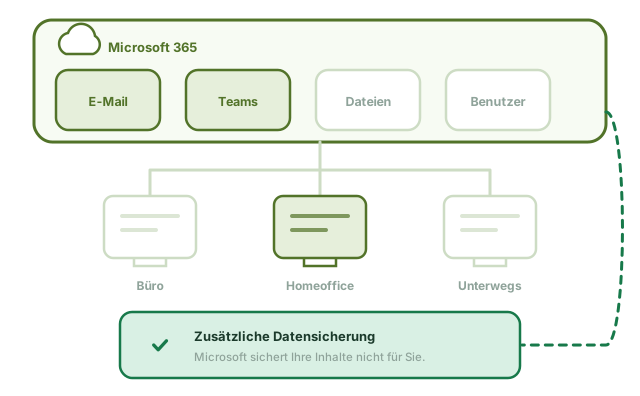
On top of that comes an assumption that can prove expensive: that Microsoft backs up your data for you. It does not. Microsoft guarantees the availability of the service, not the recovery of your content. If a mailbox is deleted, a file overwritten or an account taken over, the data is gone once short retention periods have expired.

We sort out both: a set-up that fits the way you work – and a backup that works independently of Microsoft.

Microsoft 365 with email, Teams and files, connected to workstations in the office, at home and on the move, plus an additional backup
  • Switchover without downtime – the cut-over takes place outside your working hours
  • Old emails and calendars come across, along with distribution lists and shared mailboxes
  • Traceable permissions instead of ones that have grown over time
  • Multi-factor authentication, because otherwise a stolen password is enough
  • Your own backup that does not depend on Microsoft
  • Licences checked regularly – you only pay for what is needed

Services

What we take care of around Microsoft 365

Switchover & migration

Moving from your own Exchange server, from individual POP3 mailboxes or from another provider. We transfer emails, calendars, contacts, distribution lists and shared mailboxes.

  • Inventory beforehand
  • Cut-over outside working hours
  • Fallback plan for emergencies

Email & Exchange Online

Mailboxes, shared mailboxes for info and accounts addresses, distribution lists, consistent signatures, out-of-office replies and archiving.

  • Shared mailboxes
  • Consistent signatures
  • Archiving according to retention period

Teams & collaboration

Teams and channels with a structure that will still make sense in two years’ time. File storage with clear responsibilities instead of five copies of the same file.

  • Team structure by department
  • External guests managed properly
  • Organised storage instead of file chaos

Users & licences

Joiners, movers and leavers as a fixed process: create the account, assign permissions, set up devices – and reliably revoke everything when someone leaves.

  • Defined joiner and leaver process
  • Licences checked annually
  • No uncontrolled growth of permissions

Security in Microsoft 365

Multi-factor authentication, protection against phishing and malicious attachments, rules against covert forwarding to outside addresses, and traceability of unusual sign-ins.

  • Multi-factor authentication
  • Phishing and attachment protection
  • Unusual sign-ins monitored

Backup for Microsoft 365

A backup stored independently of your Microsoft account: mailboxes, files and Teams content, with defined retention and regularly tested restores.

  • Independent of Microsoft
  • Fixed retention period
  • Restore tested

How a switchover works

Moving to Microsoft 365 in four steps

The most common mistake when switching is haste. We take the time for a proper inventory – the cut-over itself then usually takes just one night.

  1. Inventory

    Which mailboxes, what sizes, which distribution lists, which shares, which devices? We look at what actually exists – not at what has been documented.

  2. Concept & date

    Structure for Teams and file storage, permissions concept, licence requirements and a cut-over date that does not disrupt your business. You receive this in writing before anything happens.

  3. Transfer & cut-over

    The data moves in the background while you carry on working as normal. The cut-over takes place in the evening or at the weekend. We are available the next morning.

  4. Briefing & operation

    A short briefing for your team, followed by ongoing operation: user management, licence checks, backup and a contact person for questions.

Why INFONET

Microsoft 365 from people who also know your network

Microsoft 365 depends on your internet connection, your firewall, your devices and your phone system. A provider that only looks after the cloud misses half the picture.

  • One contact person for both. When Teams stutters, it is rarely Teams itself. We check the line, firewall and network at the same time instead of referring you to the next service provider.
  • Sometimes we recommend less. Not every employee needs the biggest licence. An honest licence review often saves more than the project costs.
  • Hybrid is fine. Not everything has to move to the cloud. If part of it is better kept on your premises, we say so – and run both.
  • Backup is part of it. We do not set up Microsoft 365 without an independent backup. That is not an optional extra but part of a proper set-up.

Frequently asked questions

Questions about Microsoft 365

Doesn’t Microsoft back up our data itself?

No – at least not in the sense most people assume. Microsoft makes sure that the service is available and that its data centres do not fail. You are responsible for the content of your mailboxes and files.

Deleted items only stay in the recycle bin for a limited time; after that they are gone. That does not help with a compromised account or a ransomware attack that spreads via a synchronised drive. That is why we always set up an additional, independent backup.

How long does the switch from our Exchange server take?

Preparation takes one to three weeks depending on size; the actual cut-over takes one night. The mailboxes are copied in the background beforehand while you carry on working as normal – the switch only happens at the end.

On the morning after the cut-over, we are available or on site, because that is when the typical small issues come up: a signature, a mobile phone, a printer that was still sending via the old server.

Can we keep our email addresses?

Yes. Your domain and all addresses remain unchanged – nothing changes for your customers. Your old emails, calendars and contacts come across too, as do distribution lists and shared mailboxes.

Do we have to move everything to the cloud?

No. Many of our clients run a hybrid set-up: email and collaboration in Microsoft 365, with their ERP system or design data still on a server on their premises. This is often the most cost-effective solution – especially when large volumes of data are involved or a specialist application requires it.

We check what makes sense for each area individually and then run both.

What happens to the mailbox when someone leaves the company?

We agree this with you once as a general rule, instead of deciding it anew each time: block access, convert the mailbox to a shared mailbox or hand it over to a successor, set up forwarding for a transition period, then archive it according to your retention period – and the licence is freed up.

This saves licence costs and prevents an active account with a known password from remaining in the system.

Is Microsoft 365 worthwhile for ten workstations?

In most cases, yes. The comparison is not “licence costs versus zero” but “licence costs versus your own mail server, including power, maintenance, backup and replacement hardware”. From around five to ten workstations, the comparison almost always comes out in favour of Microsoft 365.

We work it out with your actual figures before you decide.

What does Microsoft 365 cost for businesses?

Microsoft charges per user per month, tiered by plan. The Business plans are aimed at companies with up to 300 users; above that, the Enterprise plans apply. The largest plan costs several times as much as the smallest – what matters is which components you actually need.

The binding prices are published by Microsoft and change regularly; we deliberately do not quote them here, because an outdated figure would be worse than none. What we do: go through with you which features each employee really needs.

Because that is exactly where the money is. In almost every environment we take on, we find users with a large plan who only use email and Office – and accounts belonging to people who left long ago.

What does Microsoft Teams cost for businesses?

Teams is already included in most Microsoft 365 business plans – so it is rarely worth licensing it separately. Additional costs only arise for telephony via Teams, for larger webinars and for advanced management features.

If you want to use Teams for telephony, please compare this with a dedicated phone system. Both work; which is cheaper depends on the number of extensions and on what you need in terms of call queues and integrations.

Is Microsoft 365 Copilot worth it?

Copilot is licensed per user on top of the base plan, which makes it a noticeable surcharge. The honest answer: it pays off for people who write a lot, have many meetings or regularly analyse large documents – for everyone else, it does not.

Our recommendation is therefore not to equip the whole organisation but five to ten people for three months. After that, you will know whether the surcharge pays off instead of guessing.

Another prerequisite is well-organised file storage: Copilot searches whatever a user has access to. Where permissions are too broad, it brings to light things that nobody should see.

Are we paying too much for Microsoft 365?

Quite possibly, yes – it is the most common finding when we take over an environment. Three causes: active licences for employees who have left, plans that are too large for people with simple needs, and add-on services that were tested once and never cancelled.

For a typical-sized business, an inventory takes a few hours. You receive a list of who has which plan and when each person last signed in.

Read more

Related services

Clients

Who trusts us

Whether a targeted one-off assignment or a long-standing partnership: when precision and reliability matter in IT, well-known names from retail, aviation, industry, medical technology, logistics and the events sector rely on our expertise. A selection from our list of references:

  • REWE

  • Lufthansa Systems

  • RTL

  • Circus Roncalli

  • Fluke

  • Tektronix

  • Ewals Cargo Care

  • emeis Fachklinik Bensberg

  • pfm medical

  • Guett-Dern

  • Hans Jungblut

  • Intercom

  • Von Borries & Partner

  • TUNA FOOD

  • Morawitzky

Free initial consultation

Do you know how many licences you are actually paying for?

We take a look at your Microsoft 365 environment and tell you what needs tidying up, what is missing – and where you can save. No obligation.

+49 221 984300-0Switchboard and support hotline

[email protected]Reply within 4 hours on working days

Robert-Perthel-Straße 7250739 Köln – Bilderstöckchen

Mon–Fri 9 am–6 pmEmergency support outside these hours by arrangement